A Deep-Dive Comparison of No-Code AI Agent Platforms for Developers
An in-depth analysis of no-code and low-code platforms for deploying AI agents, focusing on their architecture, tool use, and deployment options.
TL;DR
- Open-source platforms offer full control but require infrastructure management.
- No-code options reduce development time but limit flexibility.
- Tool-use capabilities and persistent memory are key for production AI agents.
- Security concerns include gateway token exposure and cross-session memory poisoning.
Introduction
This guide compares 12 no-code and low-code platforms for building production-level LLM agents, focusing on their architectural maturity, capabilities, and deployment options. The analysis aims to assist developers in selecting the right platform for their AI agent development needs.
| Platform | Model Support | Tool Use | Memory | Deployment Mode |
|---|---|---|---|---|
| OpenClaw | Any OpenAI-compatible | Vector + session | Self-hosted/Docker | ✅ |
| Botpress | OpenAI, Anthropic | HITL + webhooks | Table storage | Cloud/Self-hosted |
| Voiceflow | GPT-4, Claude, Gemini | API calls | Context files | Cloud only |
| Make.com | Via HTTP modules | Manual wiring | No native | Cloud only |
Depth Analysis
We focus on three platforms that stand out for production agent deployments based on architectural maturity: OpenClaw, Botpress, and AWS Bedrock.
OpenClaw: Autonomous Agent Framework
OpenClaw, also known as Clawdbot, implements a skills-based architecture inspired by Anthropic. It supports a variety of tools and has robust memory management capabilities.
| Feature | OpenClaw | Botpress | Voiceflow |
|---|---|---|---|
| Skills-based Architecture | ✅ | ✅ | ❌ |
| Custom Tool Integration | ✅ | ✅ | ❌ |
| Persistent Session Memory | ✅ | ❌ | ❌ |
| Error Handling Mechanisms | ✅ | ✅ | ❌ |
Tool Use and Memory Comparison
Tool implementation varies significantly across platforms, from UI-configured API calls to raw function definitions.
| Platform | Tool Definition | Auth Handling | Error Recovery |
|---|---|---|---|
| OpenClaw | Python functions + decorators | Built-in secrets vault | Auto-retry with backoff |
| Botpress | Webhook URL mapping | OAuth2 in cloud | Manual try/catch |
| Voiceflow | Visual API block | Bearer token UI | Block-level fallback |
⚠️ Warning: Exposing OPENCLAW_GATEWAY_TOKEN in client-side code or logs grants full UI access to your agent. Always load tokens from secrets management and rotate them on deployment.
Cost Optimization Patterns
Token costs dominate agent economics. Implement caching, selective LLM routing, and prompt compression to control spend.
Setup
To get started with OpenClaw, you need to configure your environment and initialize the agent.
# Install Docker and pull the OpenClaw image
docker pull openclaw/openclaw
# Run the OpenClaw container
docker run -d -p 18789:18789 --name openclaw openclaw/openclaw
Configuration
# config.yaml - OpenClaw agent configuration
agent:
  name: "knowledge-assistant"
  gateway_token: "${OPENCLAW_GATEWAY_TOKEN}"  # Required for secure UI access

skills:
  - name: "document_qa"
    type: "rag"
    enabled: true
    config:
      vector_store: "chroma"  # Options: chroma, pinecone, qdrant
      collection: "knowledge-base"
      embedding_model: "text-embedding-3-small"
      top_k: 5

  - name: "calculator"
    type: "tool"
    enabled: true
    config:
      endpoint: "http://tools.internal:8000/calculate"
      timeout: 5

memory:
  session_ttl: 3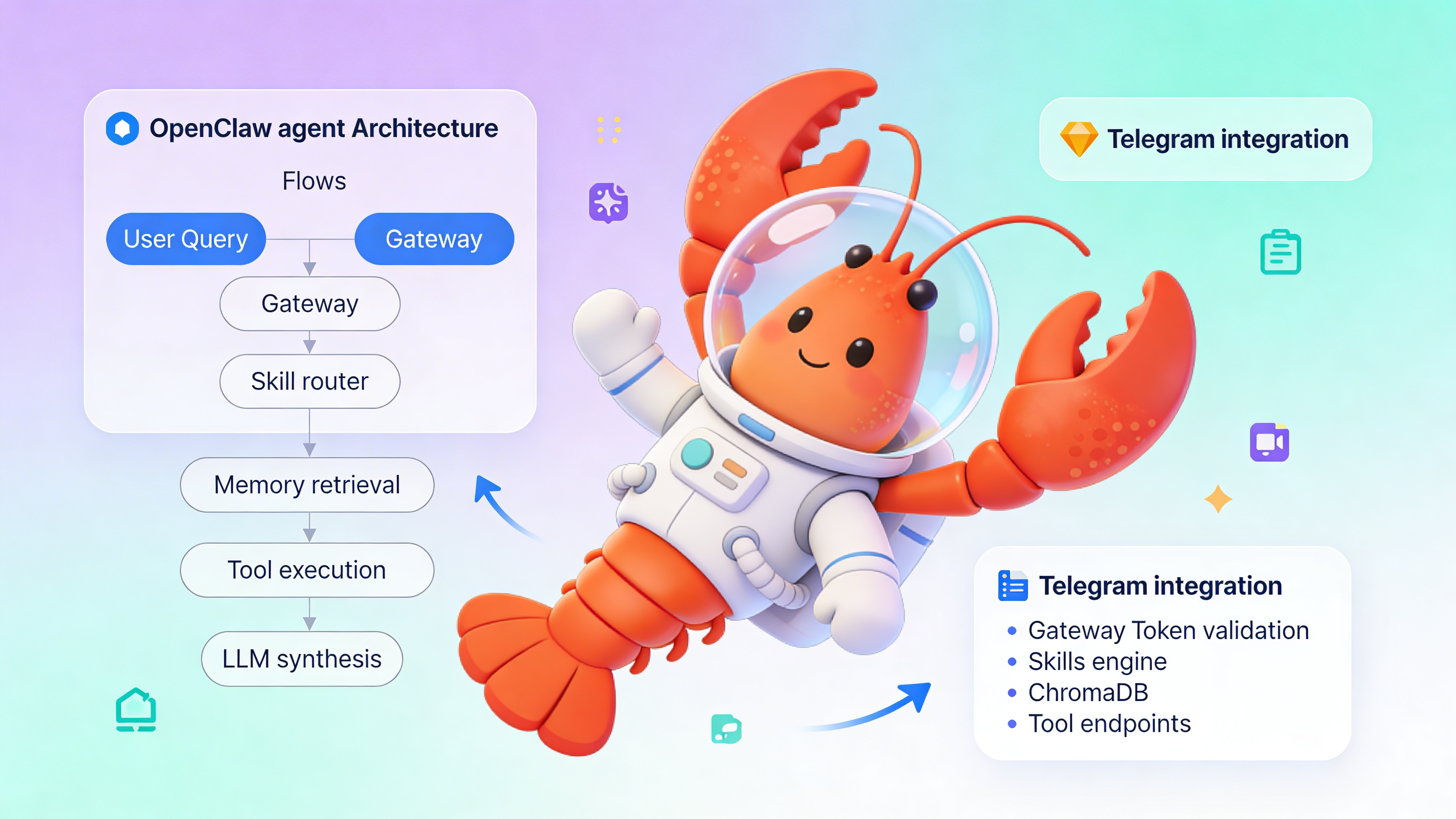
See Also
- OpenClaw Documentation — https://docs.openclaw.org
- EasyClawd Managed Hosting Quickstart — https://easyclawd.com/docs/quickstart
- Building Reliable AI Agents: Patterns and Anti-Patterns — https://blog.easyclawd.com/reliable-agents-2025
Ready to deploy your OpenClaw AI assistant?
Skip the complexity. Get your AI agent running in minutes with EasyClawd.
Deploy Your AI Agent