OpenClaw Telegram Integration: Production-Ready LLM Agent Setup
Complete technical guide for connecting Telegram bots to OpenClaw LLM agents. Includes configuration, security, and deployment patterns.
TL;DR
- Generate bot token via @BotFather and store securely; never commit to version control
- Execute `openclaw configure` and select Telegram API channel from the interactive wizard
- Configure token via `OPENCLAW_TELEGRAM_TOKEN` environment variable or YAML config file
- Approve user pairing with `openclaw pairing approve telegram <code>` after first contact
- Test with direct message; verify logs show `telegram.received_message` events and agent responses
Why Telegram Is the Default Channel for OpenClaw Agents
Telegram's Bot API provides the lowest latency and simplest authentication model for LLM agent deployment. OpenClaw treats Telegram as a first-class channel with native polling and webhook support, making it ideal for rapid prototyping and production workloads.
| Channel | Status | Latency | Setup Complexity | Production Readiness |
|---|---|---|---|---|
| Telegram (Bot API) | ✅ Stable | < 200ms | Low - Single token | Fully supported |
| Discord (Webhook) | ⚠️ Beta | 300-500ms | Medium - OAuth + intents | Limited features |
| Slack (Socket Mode) | ⚠️ Alpha | 400-600ms | High - App manifest required | Not recommended |
| WhatsApp Business | ❌ Not Supported | N/A | N/A | Use Twilio bridge instead |
| iMessage (ADB) | ❌ Deprecated | Variable | Very High - Device bridge | Removed in v2.4 |
Prerequisites and Security Model
Before configuration, obtain a bot token from @BotFather. OpenClaw implements a mandatory pairing system that maps Telegram user IDs to agent permissions, preventing unauthorized access to your LLM agent.
| Secret Type | Storage Method | Security Level | Recommendation |
|---|---|---|---|
| Telegram Bot Token | Environment variable | ⚠️ Medium - Visible in process list | Use for development only |
| Telegram Bot Token | Vault (AWS Secrets Manager) | ✅ High - Rotatable, access logged | Production default |
| Pairing Codes | Ephemeral memory | ✅ High - Expires after 15 mins | Never persist to disk |
| User ID Whitelist | Config file or database | ⚠️ Medium - Static list | Enable dynamic policy updates |
Configuration Walkthrough
Initialize OpenClaw using the interactive wizard or supply configuration via environment for headless deployments.
# Interactive setup for development
openclaw configure

# Non-interactive setup for CI/CD pipelines
export OPENCLAW_TELEGRAM_TOKEN="7923339655:AAGMA8fje_GX2AL0Z53R6cq6ZvUg1vSJz-U"
openclaw configure --channel telegram --token-env TELEGRAM_TOKEN --non-interactive

# Verify channel activation
openclaw channels list --output json

# Monitor Telegram events in real-time
tail -f /var/log/openclaw/agent.log | jq '. | select(.channel == "telegram")'
Token Management and Access Policies
Store tokens securely and configure granular access policies. The YAML configuration supports dynamic token injection and admin user auto-approval.
# config/openclaw.production.yaml
agent:
  name: "customer-support-agent"
  model: "claude-3-sonnet-20240229"
  max_tokens: 2000
  temperature: 0.2

channels:
  telegram:
    enabled: true
    token: "${TELEGRAM_TOKEN}"          # Injected via secrets manager
    mode: "polling"                     # Alternative: webhook
    polling_interval: 2                 # Seconds between /getUpdates calls
    timeout: 30                         # Long polling timeout
    max_connections: 40                 # Concurrent update handlers

security:
  pairing_required: true                # Mandatory for new users
  pairing_timeout_minutes: 15
  approved_users_file: "/etc/openclaw/approved_users.json"
  admin_users:                          # Auto-approved Telegram IDs
    - 123456789                         # Replace with your ID from @userinfobot
  rate_limit_per_minute: 30             # Per-user message throttle

logging:
  level: "info"
  include_metadata: true
  channel_filters:
    telegram: ["message.received", "message.sent", "pairing.attempt"]

memory:
  type: "postgres"
  connection: "${DATABASE_URL}"
  message_retention_days: 90

observability:
  metrics_enabled: true
  telegram_webhook_latency_buckets: [0.1, 0.2, 0.5, 1.0, 2.0]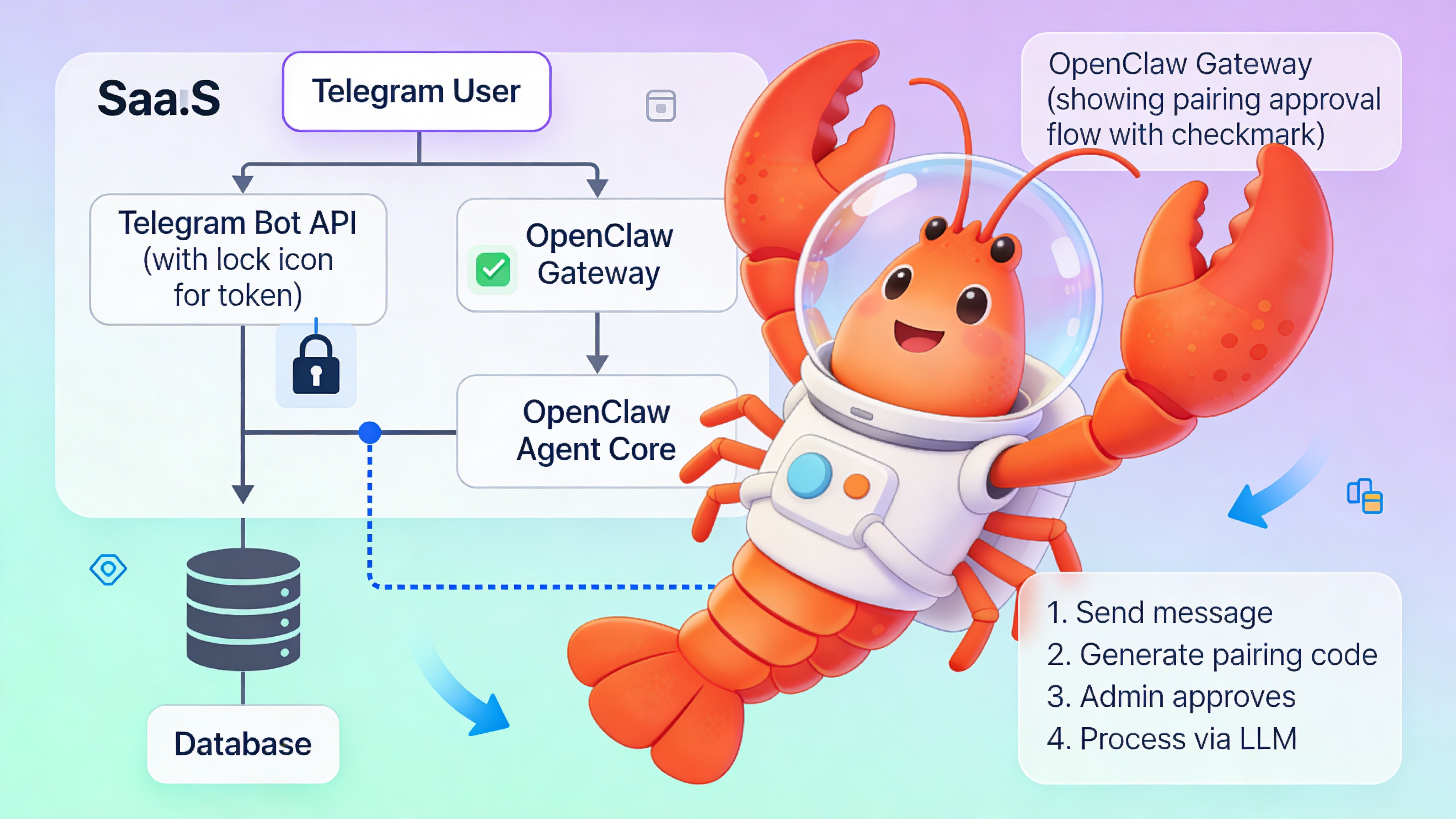
⚠️ Warning: Exposing your Telegram token in logs or error messages creates a critical security vulnerability. Attackers can hijack your bot to intercept LLM conversations, exfiltrate user data, and rack up API charges. Always mask tokens in log outputs and configure log filtering. Rotate compromised tokens immediately using BotFather’s `/revoke` command.
Pairing and Identity Verification
The pairing system binds Telegram user IDs to agent sessions. This prevents arbitrary users from accessing your LLM agent while maintaining an audit trail.
| Step | User Action | OpenClaw Response | Verification |
|---|---|---|---|
| 1. Initial contact | User sends any message to bot | Blocks message, generates pairing code | Check logs for `pairing.requested` event |
| 2. Code retrieval | N/A (auto-displayed in bot chat) | Bot replies with code and approval command | Code format: 6-character alphanumeric |
| 3. Admin approval | Admin runs approval command in terminal | Updates approved_users.json, confirms in logs | Command: `openclaw pairing approve telegram <code>` |
| 4. Session activation | User re-sends original message | Agent processes through LLM pipeline | Log shows `telegram.message.processed` success |
Production Deployment Patterns
Choose deployment architecture based on scale and isolation requirements. For teams avoiding infrastructure overhead, deploy via easyclawd.com which provisions managed OpenClaw containers with Telegram pre-configured.
| Pattern | Configuration | Best For | Trade-off |
|---|---|---|---|
| Single container | Docker Compose, local config file | Development, < 1000 messages/day | No horizontal scaling |
| Kubernetes + ConfigMap | Token in external secrets store | Production, 1K-50K messages/day | Operational complexity |
| Multi-tenant gateway | OpenClaw per user, shared reverse proxy | SaaS platforms, > 50K messages/day | Higher resource cost |
Troubleshooting and Observability
Enable debug logging and monitor key metrics to diagnose connection issues. OpenClaw exposes Prometheus metrics for telegram_update_latency_seconds and telegram_message_failures_total.
| Symptom | Root Cause | Fix |
|---|---|---|
| Bot not responding | Token mismatch or invalid | Revoke and regenerate via BotFather, update secret store |
| No pairing code shown | User already approved or rate limited | Check approved_users.json, clear cache with `openclaw cache flush` |
| Intermittent delays | Polling interval too high or network timeout | Reduce polling_interval to 1s, increase timeout to 60s |
| 403 Forbidden errors | Bot blocked by user or Telegram API ban | Send /unblock to @BotFather, check Telegram API status |
| Memory warnings | Message retention not configured | Set message_retention_days to prune old sessions |
See Also
- OpenClaw Channel Configuration Reference — https://docs.openclaw.ai/channels/telegram-configuration
- Telegram Bot API Security Best Practices — https://core.telegram.org/bots/security
- LLM Agent Production Checklist — https://blog.openclaw.ai/deploying-agents-at-scale
Ready to deploy your OpenClaw AI assistant?
Skip the complexity. Get your AI agent running in minutes with EasyClawd.
Deploy Your AI Agent